Add or update the invoice information in your company account details. Keeping this information updated will prevent important messages concerning invoicing or payment being missed by your company. This ensures that all users can continue to work on the ProductIP Platform without interruption.
Feature access
This feature is available for all ProductIP plans. Only users with the Admin role can change and/or update the company account invoicing information and the contact details.
Before you begin
Login to your account which has the Admin role. Without an account with an Admin role it is not possible to add or update the company account invoice information and contact details.
Video instructions
A short step-by-step guide will follow soon!
Steps
Follow these steps to update your company account (invoice) information:
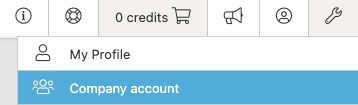
- Go to Settings > Company Account
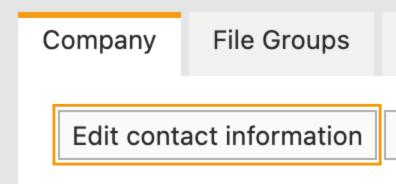
- Click Edit contact information
- Fill out the 3 sections: Contact Information, Invoice Address & Public Information
- Make sure that an email address is added to Invoice address
- Click Save
Tips and best practices
- Provide a valid email address for the Contact Information & the Invoice Address sections. This way invoices are not declined and important messages are not missed.
- Keep your information up to date for easy contact by ProductIP, your supplier(s) or another third party who looking for your Public Information
Troubleshooting
- The added or updated information is not showing on the page.
Refresh the page or clear your browser cache. Try again.
Still having issues? Contact ProductIP via helpdesk@productip.com.
FAQ
- Can I leave the email addresses empty?
No. ProductIP will send invoices to the invoice address as present in the database and without a valid email address ProductIP might not reach you in time.
Was this article helpful?
That’s Great!
Thank you for your feedback
Sorry! We couldn't be helpful
Thank you for your feedback
Feedback sent
We appreciate your effort and will try to fix the article