If you are a new user and don’t have an account yet, you can create your ProductIP account to start managing your product compliance. If your company already has an account, you can register and join your company’s account (you will receive an invitation email). Your account gives you access to the platform, allows you to attend events and trainings, create Technical Files, and collaborate with your team.
If you already have an account, you can directly log in to ProductIP (See Related articles).
Feature access
All users can register for a ProductIP account. This feature is available for all plans.
Before you begin
- Prepare your email address (this will be your username).
- Ensure you have access to your inbox to receive the confirmation email.
- Check your inbox to see if you have received an invitation email sent by your colleague or customer from the ProductIP platform.
Steps
For a new account
1. Go to the ProductIP registration page or click the registration link in the email sent by your customer.
2. Enter the details. Fields marked with * are mandatory.
3. Create and confirm your password.
4. Accept the general conditions and privacy statement.
5. Click Register.
6. Check your inbox (or spam folder) for a verification email containing a link to activate your account. Follow the instructions in the email to complete your registration (Not yet applicable to Document Request users; will apply in the future).
If you’ve been invited to join a company account
1. Click the registration link in your email sent by your colleague.
2. Follow the same steps as indicated above to set up your account using the email address to which the email was sent.
3. Your company admin will receive an email requesting for access to the existing company account.
Tips and best practices
- Use a strong, memorable password which must have at least 12 characters, an uppercase and lowercase character and a digit.
- Add ProductIP to your safe sender list to avoid missing confirmation emails.
- Bookmark the ProductIP login page for quick access.
Troubleshooting
- Didn’t receive the verification email?
Check your spam folder or verify that your email address was entered correctly.
- Can’t log in after registration?
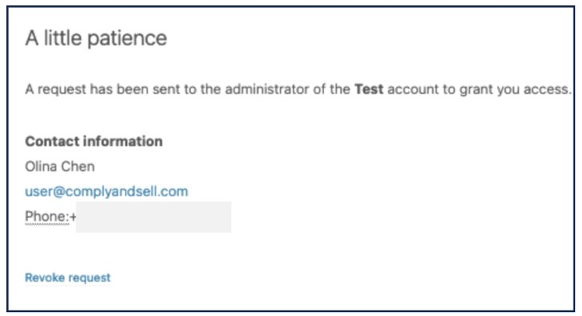
If you see this following message on ProductIP after registration, it means your request has been sent to your company admin. You can contact the admin and ask them to accept your request and grant access.
Related Articles
Was this article helpful?
That’s Great!
Thank you for your feedback
Sorry! We couldn't be helpful
Thank you for your feedback
Feedback sent
We appreciate your effort and will try to fix the article